Quick answer
Glass cubicles can preserve sightlines and share light, but the result depends on the exact assembly, transparency, height, gaps, room lighting, and workstation orientation. First name the option—framed panel or window, topper, desk screen, translucent door, or back-painted glass—then compare glare, observed privacy, compatibility, cleaning, and handling in a full-size mock-up.
On this page9 sections
Choose the glass assembly from the result you need
Begin with the job the glass must perform, then name the assembly. Current manufacturer examples distinguish framed glass panels or windows, frameless toppers, desk-mounted screens, translucent privacy doors, and back-painted glass surfaces. Those labels describe different supports and operating conditions, so the visual choice must remain tied to the exact workstation family and product documents. [1] [2] [3]
Match the glass assembly to the result you need
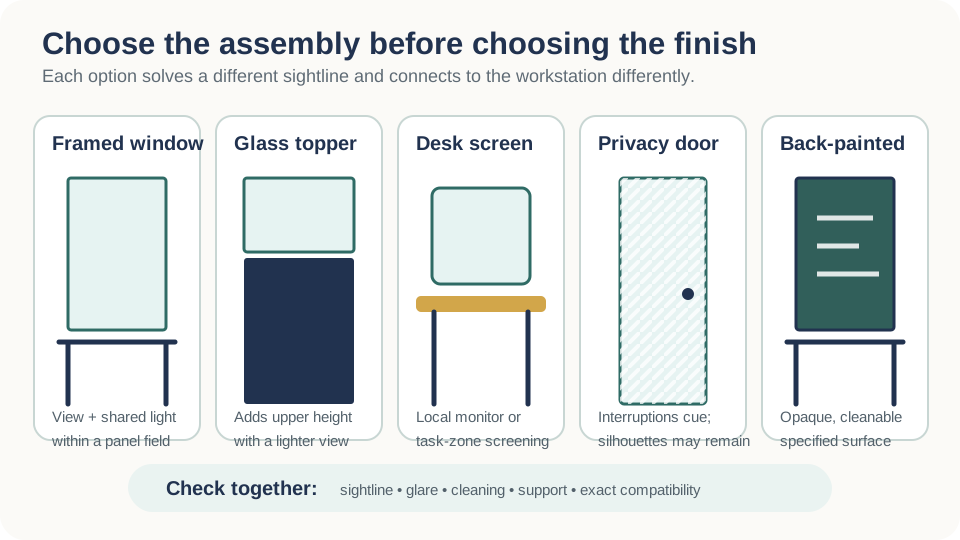
| Glass option | Best starting use | Privacy expectation | Main check |
|---|---|---|---|
| Framed panel or window | Preserve a view or shared light within a defined panel field | Clear maintains visibility; translucent treatment may obscure detail | Frame, glazing, panel series, reflection, and replacement method |
| Frameless topper | Add boundary height without making the upper zone fully opaque | Screens only the sightline covered by its height and finish | Approved base panel, holder, edge, stack rule, and cleaning access |
| Desk-mounted screen | Create a local boundary around a monitor or active work zone | Limited to its position; other approach angles remain open | Mount, clamp range, loading, sit-stand travel, and cables |
| Translucent privacy door | Signal fewer interruptions while retaining some transmitted light | May hide detail but can still show silhouettes and movement | Compatible door kit, opening, hardware, user operation, and route |
| Back-painted glass | Provide an opaque, cleanable visual surface or specified writing face | Blocks direct view through the treated field | Reflection, approved marker use, face orientation, cleaning, and mounting |
Define the glass component before comparing glass cubicles
The phrase glass cubicle can refer to several different assemblies. Steelcase lists glass windows, frameless glass, and back-painted glass skins within Answer Panel System specifications. Haworth's Compose page lists glass panels, frameless glass kits, glass toppers, and glass among its screen materials. Herman Miller lists frame-attached glass screens and a translucent privacy-door option for Canvas Wall. These are not interchangeable product categories: a structural framed panel, a glazed tile, a panel topper, a desk-mounted screen, and a door have different supports, edges, connections, movement, and replacement procedures. [1] [2] [3]
Qualitative selection screen only: quote every cost driver and verify the configured assembly; no row establishes a universal price, maintenance burden, daylight result, acoustic result, or privacy rating. Open table
| Glass component | Cost drivers to quote | Maintenance burden to test | Performance to test | Evidence limit |
|---|---|---|---|---|
| Framed glass panel or window | Panel or frame, glazing, connectors, junctions, finish, packing, handling, installation, and replacement access | Reach to both faces and edges, fingerprints, dust, aisle exposure, approved cleaner, and safe isolation after damage | Shared light, direct sightlines, glare, visual screening, and any product-specific acoustic claim | Use configured product documents and a full-size sample; do not infer daylight, acoustic, privacy, or compatibility performance from the word glass. |
| Frameless topper | Approved base panel, holder or channel, caps, width, thickness, height, packing, handling, installation, and replacement | Access above storage, cleaning of both faces and edges, dust at the channel, and removal without damaging the run | Seated and standing sightlines, added visual height, reflected light, glare, and visibility from nearby routes | Verify the exact base panel, holder, stack rule, installed height, and mock-up; approval for one family does not transfer to another. |
| Desk-mounted screen | Screen, mount, compatible worksurface, support conditions, sit-stand coordination, cable conflicts, installation, and replacement | Cleaning around mounts and edges, movement with the desk, reach at all height settings, and local damage response | Local visual screening, monitor visibility, reflections, user sightlines, and collision through the full desk travel | Use the manufacturer's mounting limits and test the configured desk; a local screen does not establish room-level acoustic privacy. |
| Back-painted or opaque glass | Glass construction, color and finish, writable specification if required, mounting, protection, matching, installation, and replacement | Approved cleaner or marker, residue, ghosting, scratches, edge access, and whether both faces require service | Visual opacity, contrast, reflection, glare, color appearance, and writable use where specified | Approve a physical finish sample and cleaning or writing test; visual opacity does not prove speech privacy or acoustic absorption. |
| Translucent door or screen | Panel or door, frame, hardware or track, opening geometry, powered interfaces, packing, installation, adjustment, and replacement | Touch points, moving hardware, both faces, track or hinge access, visibility markings, and stop-use response after damage | Detail masking, transmitted light, boundary visibility, opening movement, nearby routes, and observed privacy | Require current assembly documents, a complete mock-up, and responsible accessibility and safety review; translucent does not mean soundproof, collision-safe, or universally compatible. |
Use glass to manage sightlines—not to promise daylight
Clear or translucent elements can maintain longer views than an opaque panel, but a glass component does not create daylight. The result depends on window location, distance, workstation orientation, panel and storage heights, tint or pattern, interior lighting, monitor position, and surrounding finishes. OSHA's computer-workstation guidance recommends arranging the office to minimize glare from windows and lighting. Treat glass as one variable in a room-level lighting study, not as proof that each station will receive suitable light. [5]
| Condition | Possible benefit | Possible problem | Mock-up observation |
|---|---|---|---|
| Clear glass | Preserves view and visual connection | Exposes activity, reflections, clutter, and monitor content | View through, reflected view, collision visibility, and screen readability |
| Translucent or frosted surface | Diffuses detail while retaining brightness | Silhouettes and movement may remain visible | Detail at near and far distances under day and electric light |
| Patterned film or graphic | Targets a sightline and makes glass more visible | Pattern scale or placement can miss seated or standing eye lines | Coverage at representative heights and all approach directions |
| Back-painted glass | Creates an opaque visual surface | May produce high contrast or reflections depending on finish and light | Glare, color shift, writable use if offered, and cleaning marks |
Day-and-night mock-up
- View the sample with blinds in representative positions and electric lighting on and off
- Test monitor readability, reflected luminaires, bright windows, dark clothing, and moving people
- Photograph seated, standing, aisle, supervisor, visitor, and adjacent-workstation sightlines
- Record which observations are design judgments and which require a lighting or accessibility specialist
Separate visual screening from acoustic privacy
Glass can block a direct line of sight when it is opaque, patterned, or positioned between the viewer and the protected zone. That does not establish speech privacy. Sound can travel over, around, and through workstation boundaries and can reflect from hard surfaces. Gaps, panel height, room absorption, ceiling conditions, background sound, distance, speaker level, and listener position all matter. Do not market a glass cubicle as soundproof, and do not infer acoustic performance from transparency or thickness alone. Ask for product-specific test information and have the room strategy reviewed when confidential conversations are part of the requirement. [1] [2]
| Privacy need | Test method | Design response to compare |
|---|---|---|
| Reduce direct eye contact | Map seated and standing eye lines from nearby workstations and paths | Pattern, opacity, component height, orientation, or local screen |
| Limit view of monitor content | Observe screens from likely approach and waiting positions | Desk orientation, monitor privacy filter, local screen, or alternate workstation position |
| Make the glass boundary visible | Approach from all directions under representative lighting | Contrasting frame, markings, pattern, furniture placement, or specified manifestation |
| Reduce distraction from conversation | Observe representative tasks and talkers in the complete room | Layout, distance, absorptive surfaces, sound masking, behavior, or enclosed room |
| Protect confidential speech | Use a qualified acoustic assessment and defined performance criterion | A room-level solution rather than an unsupported panel-only promise |
Require product-specific safety and compatibility evidence
Glass selection is an assembly decision, not a loose-material purchase. Haworth's Compose glass-panel instructions identify specific channels, top caps, fasteners, and configuration restrictions; its current Compose page lists distinct framed, frameless, and topper components. Those documents illustrate why a field-supplied pane or an improvised stack should not be accepted merely because its width appears correct. Ask the manufacturer or responsible supplier to identify the glass construction, applicable testing or safety designation, thickness, edges, markings, frame or holder, fasteners, approved location, handling method, and replacement procedure for the exact item. [2] [4]
Glass assembly submittal
- Manufacturer, product family, catalog number, current drawing, regional offering, and finish code
- Glass or translucent material description, thickness, safety designation, tint or pattern, edge, corner, and marking
- Frame, channel, holder, bracket, top cap, fastener, panel, desk, or door compatibility
- Approved widths, heights, orientations, stacking restrictions, load limits, and adjacent components
- Shipping crate, storage position, lifting, personal protective equipment, installer qualification, and damaged-glass procedure
- Cleaning products, marker compatibility where applicable, film restrictions, scratch expectations, and replacement lead time
- Written resolution of field-supplied glass, reused components, drilling, modification, or missing labels
Price the cleaning and replacement cycle
Glass makes fingerprints, dust, adhesive residue, marker ghosting, scratches, and edge damage more visible than many patterned textiles. The burden depends on surface finish, touch frequency, location, lighting, cleaning chemistry, and whether both faces are reachable. A topper above storage, a pane beside an aisle, and a back-painted writing surface have different access and care needs. Obtain the product's care instructions before selecting cleaners, films, decals, or markers. Record who cleans it, from which side, with what access equipment, at what frequency, and how damage is isolated and replaced without disrupting the entire run. [2] [1]
| Operation | Question before selection | Evidence or test |
|---|---|---|
| Routine cleaning | Can both faces and edges be reached without moving unsafe loads? | Mock clean the installed sample with the approved method |
| Markings and films | Are privacy graphics, collision visibility, branding, or writable use permitted? | Manufacturer approval and sample after cleaning |
| Damage response | How is a chipped, cracked, loose, or broken component isolated and reported? | Written stop-use, barricade, removal, and replacement procedure |
| Replacement | Is the exact pane, frame, finish, and hardware identifiable and available? | Catalog record, as-built location, spare strategy, and current lead time |
| Future reconfiguration | Can the component be safely removed, transported, stored, and reinstalled? | Current disassembly instructions and reusable-component decision |
Select glass cubicles with a seven-step mock-up process
-
Write the requirement
Define the exact visual boundary, view, daylight, glare, writing, cleanability, acoustic, and brand outcomes to test.
-
Identify the assembly
Select framed panel, window, topper, tile, desk screen, door, or another documented product-specific component.
-
Verify the base system
Confirm family, generation, supporting panel or desk, frame, holders, dimensions, load and stack rules, and current regional documents.
-
Review safety and handling
Obtain the exact glass description, safety evidence, edges, markings, installation instructions, delivery method, and damage procedure.
-
Build the full-size sample
Use representative height, width, finish, pattern, furniture, storage, lighting, monitors, and neighboring stations.
-
Observe real conditions
Test seated and standing sightlines, reflections, screen visibility, distraction, cleaning, door or desk movement, and routes by day and night.
-
Release a documented selection
Issue the approved sample record, product schedule, drawings, cleaning standard, scope matrix, assumptions, exceptions, and acceptance criteria.
Quote-ready glass schedule
- Component type, manufacturer, family, model, dimensions, glass or translucent specification, and finish
- Supporting panel, frame, desk, holder, channel, hardware, door, and end-condition identifiers
- Pattern or opacity orientation, consistent graphic elevation, exposed edges, and collision-visibility treatment
- Delivery, storage, installation, cleaning, protection, punch, damage, replacement, and closeout responsibilities
- Mock-up observations, approved deviations, unresolved conditions, and named decision owners
Frequently asked questions
Do glass cubicles provide privacy?
They can provide a visual boundary, but the result depends on transparency, pattern, height, width, gaps, lighting, viewing distance, and orientation. Clear glass preserves visibility; translucent or patterned options may obscure detail without eliminating silhouettes. Test the exact assembly from likely viewing positions.
Are glass cubicles soundproof?
No general soundproof claim is justified. Sound can travel over, around, and through boundaries and reflect within the room. Request product-specific acoustic evidence and evaluate layout, ceiling, room absorption, distance, masking, and operating behavior as one strategy.
Can glass be added to existing cubicle panels?
Only when the base system, generation, panel or frame, holder, dimensions, attachment, loading, glass, and configuration are approved for that combination. Haworth's documents, for example, distinguish glass panels, frameless kits, toppers, channels, and restrictions rather than one universal add-on. [2] [4]
Is frosted glass fully private?
Not necessarily. Frosting can diffuse detail, but silhouettes, movement, color, and nearby objects may remain visible depending on lighting and distance. Mock up the exact finish under day and electric lighting before setting a privacy expectation.
What should a glass cubicle quote identify?
It should identify the exact component, glass or translucent material, dimensions, finish, safety and test documentation, supporting frame or panel, holders, hardware, installation, protection, cleaning, replacement, assumptions, exclusions, and approved mock-up.
Sources and limitations
Manufacturer sources document examples of glass components and assembly requirements; they do not prove that a component fits another family, generation, or project, or that glass alone meets a privacy, acoustic, lighting, safety, or code objective. Current product submittals, the verified site, adopted requirements, contracts, and qualified reviewers control the work.
- Steelcase: Answer Panel System
- Haworth: Compose Workspaces
- Herman Miller: Canvas Wall Specifications
- Haworth: Compose Glass Panel Installation Instructions
- Occupational Safety and Health Administration: Computer Workstations eTool: Workstation Environment